
Audiostation
Features
Alex van den Berg
Created: Apr 06, 2026 - Updated: Apr 06, 2026
Features
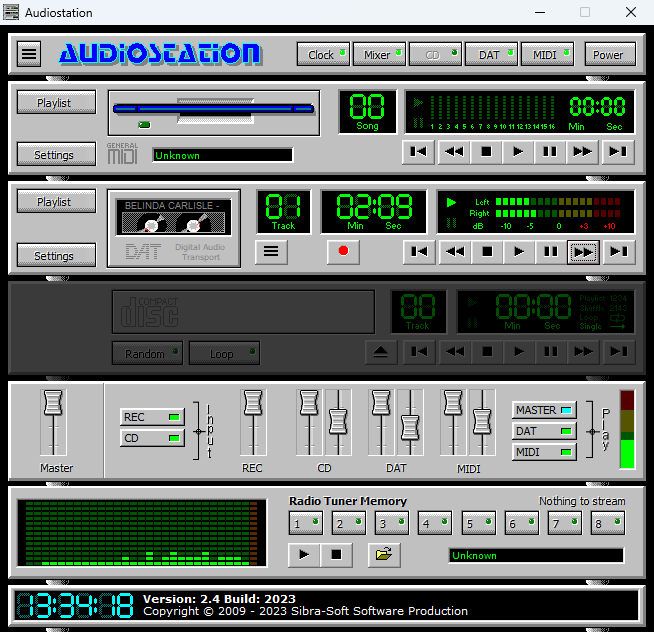
Power Bar
The Power Bar launches the various Audiostation components. Each component is launched by pressing the appropriate icon button. To close a component, press the icon button again.

Section Components
| # | Name | Description |
|---|---|---|
| 1 | Power | Terminates the Audiostation application |
| 2 | CD | Launches or closes the CD Player component |
| 3 | MIDI | Launches or closes the MIDI Player component |
| 4 | Mixer | Launches or closes the Mixer component |
| 5 | Clock | Launches or closes the clock component |
| 6 | DAT | Launches or closes the DAT component |
MIDI Player

Section Components
| # | Name | Description |
|---|---|---|
| 1 | Playlist | Open the playlist editor |
| 2 | Settings | Open de Audiostation settings dialog |
| 3 | Audio Transport Controls | Use the controls to start, stop, pause the current audio |
| 4 | Elapsed Time | The elapsed playtime of the midi file |
| 5 | Track | The current track number of the playlist |
| 6 | Filename Display | The filename of the current track |
| 7 | Floppy Animation | The animation of the floppy drive |
MP3/DAT Player

Section Components
| # | Name | Description |
|---|---|---|
| 1 | Playlist | Open the playlist editor |
| 2 | Settings | Open de Audiostation settings dialog |
| 3 | Burger Button | Open the burger menu for more playback options |
| 4 | Record Button | Use the record button to start recording PC audio |
| 5 | Audio Transport Controls | Use the controls to start, stop, pause the current audio |
| 6 | Elapsed Time | The elapsed playtime of the audio file |
| 7 | Track | The current track number of the playlist |
| 8 | Filename Display | The filename of the current track |
| 9 | Tape Animation | The animation of the tape drive |
| 10 | VU Level Meter | Audio VU level meter |